DeWalt DW735 vs DW735X: Is the Kit Worth It? (November 2026)
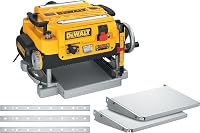
For the DeWalt DW735 vs DW735X, choose the DW735X if you need included infeed and outfeed tables plus spare knives; choose the DW735 if you don't. Both use the same 13-inch, two-speed planer design.
On this page (9 sections)
- DeWalt DW735 vs DW735X: which package fits your shop?
- Are the DW735X tables worth choosing?
- Do the DW735 and DW735X offer the same feed speeds?
- What should you know about the knives?
- How do chip ejection and snipe affect the choice?
- Is the DW734 a better alternative?
- How do you care for a DW735 or DW735X?
- What mistakes should you avoid when choosing?
- Which planer should you buy?
For the DeWalt DW735 vs DW735X, choose the DW735X if you need its infeed and outfeed tables and extra knife set; choose the DW735 if you don't. Both are 13-inch, two-speed thickness planers, so the decision is about the package and your shop setup.
The DW735X is suited to a shop that needs those additions from the start or wants spare knives ready for a future change. The DW735 fits a shop that already has a way to support boards and would rather skip extras it won't use.

DeWalt DW735 vs DW735X: which package fits your shop?
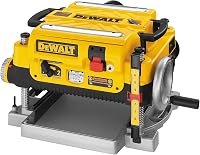
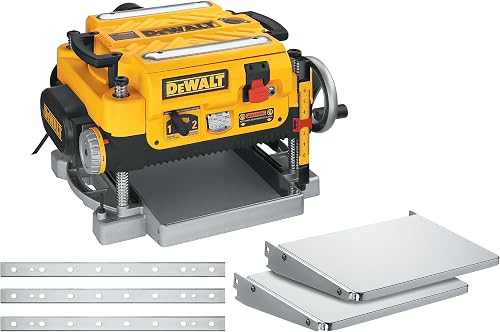
The DW735X adds infeed and outfeed tables plus an extra knife set. The DW735 shares the core planer features, including a 15 amp motor, three-knife cutter head and two feed-speed choices.
Both models have a 13-inch cutting width, fan-assisted chip ejection and an automatic carriage lock designed to reduce movement that can cause snipe. The DW735 includes a dust hose adapter; the DW735X package also includes tables, an extra knife set and a dust-ejection chute.
Use the comparison table to confirm which package matches your needs. If a particular accessory is essential, check that it is included with the exact model you are ordering.
Are the DW735X tables worth choosing?
Choose the DW735X tables if you need infeed and outfeed support as part of your planer setup. They help support material on both sides of the cutter head, but take room and don't remove the need to guide boards carefully.
Long boards can dip or rise as they enter or leave a planer if they lack support. That can make it harder to feed stock evenly, so consider the board lengths you usually handle and how the tables will sit in your shop.
The DW735X suits buyers setting up a planer station who want those tables included. It is less compelling if you already have a support arrangement that works and have no use for the kit's extra knives.
Before buying, measure the machine location and the full path a board takes through it. Leave enough room to feed and receive stock without running it into a wall, stored tools or another machine.
When does the DW735 make more sense?
The DW735 makes sense when you already have a safe way to support stock and don't need a spare knife set. You still get the shared planer design and its two feed speeds without paying for package additions you may leave unused.
This can suit an equipped home workshop or a buyer replacing a planer who already has a stable work area. It can also be a straightforward choice if your priority is the planer itself and you plan to source support equipment separately.
The DW735 package includes a dust hose adapter. Plan how you will direct chips and keep the work area clear before running the machine.
If you are planning a compact workshop around the planer, see our guide to benchtop woodworking tools. It can help you think through machine footprint and which other tools belong in the space.
Who should choose the DW735X kit?
The DW735X suits a buyer who will use both the tables and the extra knives. The tables support the material path, while a spare knife set means replacements are on hand when needed.
It can be a practical fit for a new planer station where those accessories are part of the setup list. It also suits a shop that prefers to keep a spare set ready rather than wait until knife replacement becomes necessary.
Skip the kit if you already own suitable support tables and spare knives, or if storage space is tight. The extras only help when they fill a real gap in your setup.
Do the DW735 and DW735X offer the same feed speeds?
Yes, both provide feed settings of 96 or 179 cuts per inch. Use the lower setting for dimensioning and the higher setting when you want a finer finish.
Cuts per inch describes how closely spaced the cutter marks are as the board moves through the machine. Having two settings lets you choose a feed rate for the task instead of using one rate for every pass.
The cutter head turns at a stated 10,000 rpm on both models. The DW735X kit does not add a different speed or cutter head, so its value is in the accessories.
For a new planer owner, the choice of feed rate is only one part of getting consistent results. Take light passes when you are unsure how much material a board needs, and keep the infeed and outfeed path steady.
Our guide to what a thickness planer does explains how planing brings a board to a consistent thickness. It also clarifies why a planer and a jointer solve different stock-preparation tasks.
How should you set up either planer?
Set up the planer on a stable surface with a clear path for boards and chips. Before you start, make sure the machine is secure, the work area is clear and any dust hose or chip collection arrangement is connected as intended.
Check the manual for the correct assembly and operating steps for your model. Install the tables if your package includes them, and confirm they align with the material path so boards have support as they enter and exit.
Use stock that is suitable for a thickness planer and inspect it for objects that could damage the knives. Feed boards in the direction and manner specified by the manual, and keep hands away from the cutter opening.
Start with a modest cut and check the result before making another pass. This gives you a chance to adjust the target thickness or feed setting without removing more material than planned.
What should you know about the knives?
Both models use a three-knife cutter head, and the DW735X package includes an extra set of knives. That spare set is useful if you want replacements on hand, but it may be unnecessary if you already have spares.
DEWALT says the knives last 30% longer than traditional disposable knives and make changes faster and easier. Knife life still depends on the wood and working conditions, so plan to inspect and replace them when the cut quality calls for it.
Knives are wear parts on either model. The DW735X gives you an extra set in the package, while the DW735 buyer should account for replacement knives separately when planning upkeep.
Follow the model's manual for knife changing and safety steps. Disconnect power before servicing, use the correct tools and avoid handling sharp edges carelessly.
A common buying mistake is treating the extra knife set as a permanent supply. It is a useful starting spare, but it does not remove the need to budget time and parts for future replacement.
How do chip ejection and snipe affect the choice?
Neither feature separates the DW735 from the DW735X because both models have fan-assisted chip ejection and an automatic carriage lock. These features help manage chips and reduce movement associated with snipe, but setup and work habits still matter.
The chip ejection fan moves chips away from the cutter head and out of the machine. It doesn't replace a clear exhaust path or a plan for collecting chips, so keep the outlet unobstructed and clean the surrounding area after use.
The automatic carriage lock is designed to reduce movement without manual engagement. It does not guarantee that every board will come out without snipe, so support the stock and follow the operating guidance for your planer.
A frequent mistake is assuming the included tables or carriage lock will correct every feed problem. They support the process, but boards still need controlled movement and a stable setup.
For a small workshop, think about the airflow and cleanup needs of the whole machine area. Our guide on sizing a dust collector for a small shop covers how to plan collection around your tools.
Is the DW734 a better alternative?
Consider the DW734 if your work fits its 12.5-inch cutting width and single 96 CPI feed rate. The DW735 and DW735X make more sense when you need their wider capacity or the choice of two feed speeds.
The DW734 has a three-knife cutter head and a four-column carriage lock. Its infeed and outfeed tables provide 33-1/2 inches of material support.
It can suit a shop whose boards fit within the narrower capacity and whose work does not call for a second feed setting. Skip it if you regularly need to plane stock wider than its capacity or want the finer-finish feed option available on the DW735 models.
Compare the width you actually use rather than choosing by the model name alone. Our best benchtop planer guide can help you compare other machines for a home workshop.
How do you care for a DW735 or DW735X?
Keep the planer clean, inspect the knives and follow the manual's maintenance schedule. Regular care helps you spot buildup or wear before it affects your next board.
Clear chips from the machine and work area after use, following the instructions for safe cleanup. Keep the chip outlet and any connected hose clear so material can leave the planer as intended.
Check the knives when the finish changes or cuts become less consistent. Replace or rotate them only as the manual allows, and use the correct procedure for the model.
Store any spare knife set in a safe place where the edges are protected. The DW735X's extra set is useful only if it remains in good condition and is available when needed.
What mistakes should you avoid when choosing?
Choose by the accessories you will use, your stock and your workspace, rather than by the model suffix alone. The DW735 and DW735X share the core planer setup, so paying for a kit only makes sense when the additions solve a real problem.
One mistake is counting the DW735X tables as useful without checking whether you have space to deploy them. Measure the board path as well as the machine footprint.
Another is assuming the two models have different cutting performance because one is called a kit. The key distinction here is the included tables and extra knives, while the shared design offers the same capacity and feed-speed options.
A third mistake is buying either model without planning chip management. Fan-assisted ejection moves chips, but your shop still needs a clear exhaust path and regular cleanup.
Finally, don't choose a planer as a substitute for every stock-flattening step. A thickness planer brings opposite faces to a consistent thickness, while twisted or cupped stock may need flattening first.
Which planer should you buy?
Pick the DW735X if you need its infeed and outfeed tables and want an extra knife set ready; pick the DW735 if you already have support and don't need those extras. For the DeWalt DW735 vs DW735X, the package contents provide the clearest decision rule because their main planer features are shared.
Choose the DW734 only if its narrower width and single feed rate suit the boards you plane. If you are weighing a different cutterhead approach, compare the WEN PL1326 vs DeWalt DW735.
For the larger question of whether a planer covers your stock-preparation needs, read do you need a jointer if you have a planer?. Before ordering, settle your stock width, support plan, knife needs and floor space; then choose the model whose package fits that plan.
Frequently asked questions
What is the difference between the DeWalt DW735 and DW735X?
The DW735X package includes infeed and outfeed tables and an extra set of knives. Both models have a 13-inch cutting width, a 15 amp motor and a three-knife cutter head.
They also have feed-speed options of 96 or 179 cuts per inch, so choose based on whether those included extras solve a need in your shop.
Does the DW735X have a different cutter head?
No. The DW735 and DW735X share a three-knife cutter head with a stated cutter-head speed of 10,000 rpm.
The difference is in the package contents: the DW735X includes tables and an extra knife set, while the DW735 package does not.
Should I buy the DW735X if I already have planer tables?
The DW735X tables may add little value if your existing setup already supports boards safely through the cut. The extra knife set may still be useful, so decide whether having spare knives on hand matters to your workload before choosing the kit.
Is the DW734 an alternative to the DW735?
The DW734 is a related option with a 12.5-inch cutting width and a 96 CPI feed rate. The DW735 models offer a 13-inch width and two feed-speed choices, 96 or 179 CPI.
Check your widest stock and finish needs before choosing between them.
Do the DW735 and DW735X use the same feed speeds?
Yes. Both have feed-speed options of 96 or 179 cuts per inch.
Use the lower setting for dimensioning and the higher setting when you want a finer finish.
The DW735X package does not change the shared feed-speed options.